


FreeClaim: Class Action Money
4.742.00 Reviews
App Specs
- Version
- 1.4.4
- Updated On
- License
- Free
- Downloads
- 10,000+
- Developer
- Qupid, LLC
- Categories
- Finance
- Platform
- Android
Screenshots
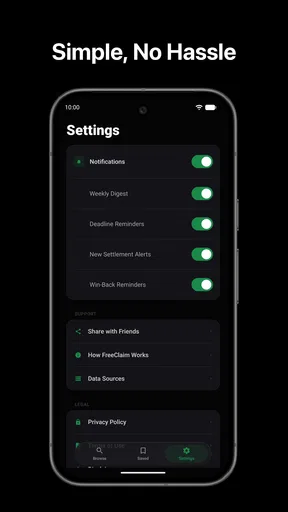
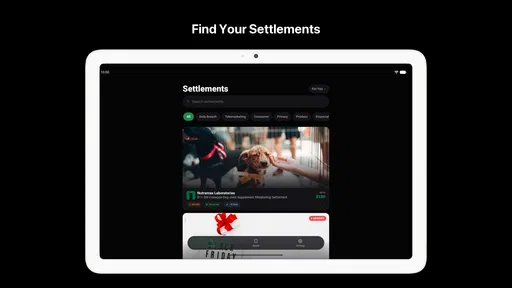
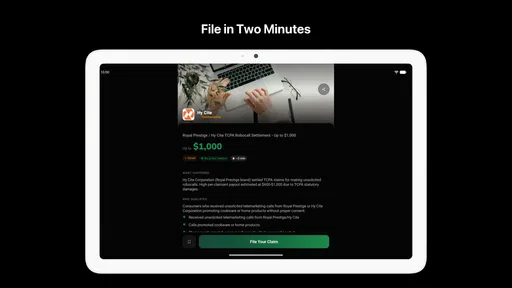
 Analysis by AppCompare
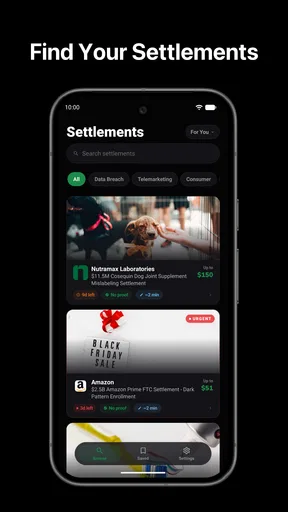
Finding money from a class action settlement or an overlooked rebate usually sounds easier than it feels. Notices get buried in email, eligibility rules are easy to misunderstand, and refund deadlines can pass before I even realize a claim exists. FreeClaim: Class Action Money is built around that problem. It is a free finance app from Qupid, LLC that helps people look for possible settlement, rebate, and refund opportunities in one place.
My first impression is that the app makes an otherwise scattered task feel more approachable. It is not a budgeting tool, a bank, or a replacement for legal advice. Its value is much narrower and more practical: it gives me a place to check whether a purchase, subscription, product, or service may connect me to money I could claim. That focus is useful, especially for someone who has never filed a settlement claim before.
The most important mindset is to treat FreeClaim as a discovery tool, not a promise of payment. Seeing a possible match does not automatically mean I qualify, and a claim may still require proof, a form, or action before a deadline. Used with that expectation, the app can become a sensible part of a monthly “money I may be missing” check.
What the first use of FreeClaim feels like
The app’s short description, “FreeClaim,” is brief, but the longer purpose is clear: it is aimed at class action settlement, rebate, and refund searches. That makes it most useful for people who want to investigate possible compensation without manually searching many unrelated websites or relying on a notice they may never see.
After installing it, I would approach the first session as a quick review of opportunities rather than a complicated financial setup. I would keep relevant purchase memories nearby: products I bought, services I used, subscriptions I canceled, and companies I dealt with during the periods mentioned in any result. That preparation matters because eligibility often depends on details that are easy to forget.
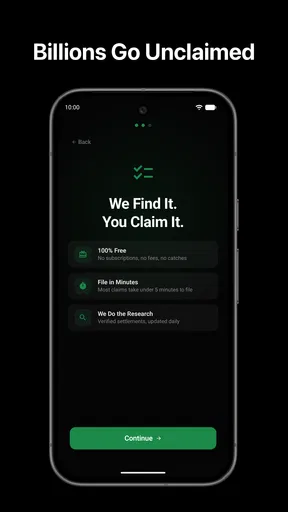
The app is free, which removes the biggest barrier to trying it. It is also rated for Everyone, so its presentation is intended for a broad audience rather than a specialist financial user. On Android, the listed minimum operating system is version 7.0, making it accessible on many older devices as well as newer ones.
FreeClaim has reached over ten thousand installs and holds a 4.8 average from around nine hundred ratings. Those figures suggest that many users find the basic idea useful, although they should not be read as proof that every person will receive money. A high rating can reflect a clear interface or helpful discovery process, while individual results still depend on eligibility and available claims.
Worth Reading Before You Choose

Flipboard Shows What News Apps Must Do Beyond the Feed

Switching to Android Auto Means Rethinking Your Driving Routine

Google Calendar Makes a Crowded Week Easier to Manage

Ludo King Makes the Most of the Minutes Between Plans

Baby Panda World Brings Quick Play to Modern Phones, but Its Game Library Feels Busy

ESPN’s Live Game View Makes Following Close Games Easier
The current version is 1.4.4. I would still read each opportunity carefully inside the app and follow the instructions attached to it, because settlement details can change independently of an app update. The developer is Qupid, LLC, and the app’s role is to help surface possibilities rather than decide legal eligibility on my behalf.
How I would prepare before searching
A common mistake is opening a refund-finder app with no idea what to check. I get better results when I make a short personal inventory first. I think through recent and older purchases, recurring subscriptions, food and household products, travel services, financial services, and digital accounts. I do not need perfect records to begin, but even a rough list helps me recognize a relevant result.
I also separate “I remember using this” from “I can prove I used this.” That distinction is important. A claim may accept different kinds of documentation, or it may use a declaration instead of a receipt, but I should never assume that memory alone is enough. If FreeClaim points me toward an opportunity, I check the stated requirements before spending time gathering anything.
One useful habit is to keep a small folder on my phone for receipts, order confirmations, cancellation emails, and account notices. I would not upload anything merely because a result appears. Instead, I would first read what the claim asks for, confirm that the request seems relevant, and then decide whether the document is necessary. This keeps the process organized without turning a simple search into unnecessary paperwork.
Moving from installation to the first meaningful result
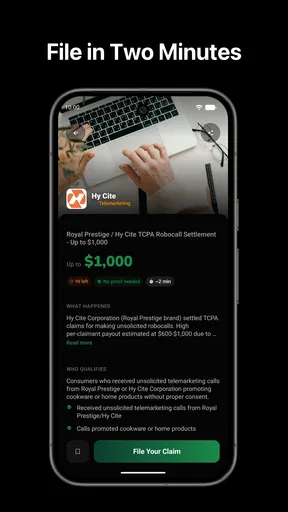
The first successful action is not necessarily receiving a payment. For a new user, success is finding one opportunity that appears relevant and understanding what must happen next. I would open a result, read the eligibility language slowly, note the deadline, and identify the requested information. If the opportunity does not fit my circumstances, I would discard it rather than forcing a match.
That last step is more valuable than it sounds. Refund and settlement notices often use familiar brand names, but a familiar name does not establish eligibility. The relevant question is whether I used the product or service in the required way and during the required period. I would treat the app’s results as prompts for verification, not as personalized legal conclusions.
For a realistic everyday example, imagine I remember paying for a subscription that I canceled after noticing an unexpected charge. I open FreeClaim during a monthly financial check and find a possible refund-related listing. My next move is not to submit immediately. I compare the dates, review whether the service and billing situation match, look for the official claim instructions, and gather only the information requested. If the details line up, submitting the claim becomes a clear, manageable task instead of a vague search.
Another useful scenario involves an older purchase that I had forgotten. I may recognize the product name but have no receipt at hand. Rather than abandoning the result, I would check whether alternative proof is accepted, search email for an order confirmation, and inspect old payment records if appropriate. If the documentation requirement is too demanding or the match is weak, I move on. The time saved by making that decision early is one of the app’s practical benefits.
Where new users can become confused
The biggest source of confusion is the difference between a listing and an approved claim. A result can indicate that an opportunity exists, but it cannot guarantee that I qualify or that money will be awarded. I would be cautious with any wording that makes a possible payment sound automatic. The responsible path is always to read the official eligibility and submission instructions connected with the opportunity.
Another point that deserves attention is the difference between a class action settlement, a rebate, and a refund. They may all involve money coming back, but the conditions can be very different. A rebate may require proof of purchase and a particular product. A refund may relate to a billing practice or service issue. A settlement may cover a defined group and time period. I would not use one category’s assumptions to interpret another.
Deadlines are another easy trap. A result can be relevant today and useless after the claim period closes. I would record the deadline immediately, preferably in my calendar, instead of assuming I will remember it. If a result involves several stages, I would note not only the submission date but also any later request for documents or confirmation.
Privacy deserves the same careful attention as eligibility. Before entering personal details, I would read the instructions and make sure I understand where the claim is being submitted. I would avoid sharing sensitive information simply to explore a listing. A good workflow is to investigate first, verify the opportunity, and provide only what the actual claim process requires.
I would also watch for duplicate effort. The same underlying settlement may appear in more than one place or be discussed across different notices. Submitting multiple claims for the same situation can create confusion and may not be allowed. Once I decide to pursue an opportunity, I keep a note of what I submitted and when, so I do not accidentally repeat the process.
Three practical habits that make the app more useful
- Use a recurring review schedule. I would check FreeClaim at a regular interval rather than only after seeing a social media post about a settlement. A consistent routine gives new opportunities a better chance of being noticed before their deadlines.
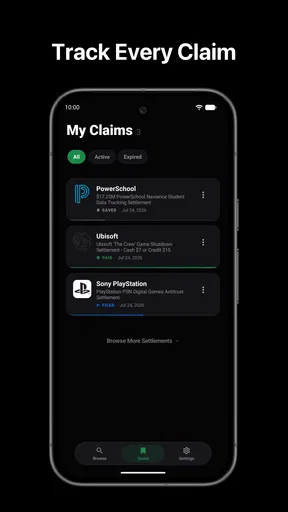
- Keep an eligibility record. For each promising result, I would write down the product or service, approximate usage date, possible proof, deadline, and current status. This turns a list of possibilities into a manageable set of decisions.
- Separate discovery from submission. I would browse first, verify second, and submit third. This three-step pause reduces impulsive entries and makes it easier to spot a mismatch between my situation and the formal requirements.
These habits address a weakness common to refund-finder tools: finding opportunities is easier than completing them correctly. FreeClaim can shorten the search, but I still need a personal system for evidence, deadlines, and follow-through. The app is most effective when it becomes the starting point of that system rather than the entire system.
What FreeClaim does better than ordinary alternatives
The usual alternative is to search the web manually. That approach can work, but it is inconsistent. I might search only for a company I already remember, miss a less obvious product category, or find outdated commentary instead of the relevant claim instructions. FreeClaim’s appeal is convenience: it gives me a focused place to look instead of requiring a new search strategy every time.
Email alerts are another alternative, but they depend on receiving and noticing the right message. People change addresses, unsubscribe from mailing lists, or overlook notices among promotional mail. A dedicated app creates a separate reminder point. That does not guarantee complete coverage, yet it can reduce dependence on chance.
General personal-finance apps are better for tracking spending, bills, savings, and budgets. They may show where money is going, but they are not designed specifically to identify settlements or rebates. If my goal is financial planning, I would choose a budgeting tool. If my goal is checking for possible money connected to past purchases or services, FreeClaim is more directly relevant.
Manual research remains better when I need authoritative detail or have a complicated situation. If a claim involves a business dispute, unusual documentation, or a legal question, I would go to the official administrator’s instructions and seek qualified advice when necessary. FreeClaim can point me toward a possibility, but it should not replace careful reading or professional judgment.
Who will benefit most, and who should skip it
I think the app is a good fit for people who frequently forget about rebates, rarely notice legal notices, or want a low-effort way to review possible claims. It is also useful for someone helping a family member organize old purchases and subscriptions. The free price makes experimentation easy, and the broad age rating means the concept is not limited to a specialist audience.
It is less suitable for someone expecting guaranteed income or instant payments. It is also not the right primary tool for managing a household budget, monitoring investments, preparing taxes, or resolving a disputed charge directly with a bank. Those jobs require different services and, in some cases, direct contact with the company involved.
I would skip relying on it alone if my situation requires extensive legal interpretation. A settlement finder can help me notice a possibility, but it cannot tell me how a claim may affect a separate dispute or whether accepting a settlement is the best decision in a complex case. In that situation, official documents and professional advice matter more than convenience.
My recommended path after the first search
Once I find a promising result, I would take a screenshot or note the opportunity’s name, then read the full instructions rather than stopping at the headline. I would confirm the qualifying product or service, the relevant period, the required proof, and the closing date. If everything fits, I would complete the claim carefully and save a copy of what I submitted.
If nothing matches during the first session, I would not consider the app useless. The value may be in establishing a repeatable check. I would return later, especially after remembering an old purchase or finding a forgotten receipt. The app works best for patient users who treat possible refunds as occasional financial housekeeping rather than a guaranteed source of cash.
My final view is favorable but measured. FreeClaim: Class Action Money gives a specific task a simpler home, and its free access makes that task easy to try. I like the idea of using it as a discovery layer before moving to the formal claim process. The strongest results will come from users who verify every match, protect their personal information, track deadlines, and accept that some searches will lead nowhere.
For a first-time user, I would install it, make a short list of past purchases and services, review the first relevant result slowly, and complete only the opportunity that genuinely fits. If you use FreeClaim as an organized checkpoint rather than a promise of compensation, it can turn forgotten settlement and refund possibilities into practical actions.
Pros
- Simple interface makes it easy to browse available class actions.
- Claim details explain eligibility
- deadlines
- and potential payments.
- Useful notifications can help users avoid missing filing deadlines.
- Free to download and use without upfront claim submission fees.
- Convenient access to claim forms from a mobile device.
Cons
- Eligibility depends on specific case requirements and location.
- Payout amounts are uncertain and may take months or years to arrive.
- Some claims require supporting documents or detailed personal information.
- The app cannot guarantee approval or payment for submitted claims.
- Available class actions may vary and become outdated after deadlines pass.
FAQs for FreeClaim: Class Action Money
What is FreeClaim: Class Action Money?
FreeClaim: Class Action Money is an app designed to help users discover and review potential class action settlements and other consumer claims. It may provide information about eligibility, deadlines, required documentation, and estimated payment amounts. The app is primarily an information and claim-discovery tool, so users should carefully read each settlement’s official terms before submitting personal details or making a claim.
How does FreeClaim: Class Action Money work?
After opening the app, users can browse available class action settlements and search for claims that may apply to products, services, or purchases they have used. Each listing may explain the case, eligibility requirements, filing deadline, and submission process. In my experience, the most important step is comparing the app’s information with the official settlement website because terms, deadlines, and payment estimates can change.
Is FreeClaim: Class Action Money legitimate and safe to use?
FreeClaim may be useful for finding settlement opportunities, but users should still exercise normal caution because the app is not the court, law firm, or settlement administrator handling every case. Avoid sharing unnecessary sensitive information, verify links before submitting forms, and check the official court-approved settlement notice. Never assume that an estimated payment is guaranteed, since final amounts depend on the case and number of valid claims.
Does FreeClaim guarantee that I will receive money from a class action settlement?
No. FreeClaim cannot guarantee eligibility, approval, or payment. A claim is usually reviewed by the official settlement administrator, and you may need to provide accurate purchase information, account details, or other supporting evidence. Even if you appear eligible, payments can be reduced, delayed, or denied depending on the settlement fund, the number of approved claims, court decisions, and whether you submit everything before the deadline.
Is FreeClaim: Class Action Money free, and what should I check before downloading it?
Before downloading, review the app’s current store listing for pricing, subscriptions, in-app purchases, privacy practices, permissions, and developer information. An app that helps locate claims may be available without an upfront charge, but features or services can vary by version and region. Also check recent user reviews, update history, and the privacy policy so you understand how browsing activity and personal information may be collected or shared.


